
保持最后三个警报可见
- 打开 多平台直播提醒 → 多条提醒 / 事件列表.
- 选择 最近三条 — 透明。这使得堆叠、紧凑卡和 保持警报直至更换。更改 可见的警报 对于不同的计数。
- 选择 预览示例事件 查看虚构的 Twitch、YouTube 和 Facebook 事件。此预览不会连接到您的流。
- 复制多流警报框链接。在 OBS Studio 或 Streamlabs Desktop 中,添加 浏览器来源 到您的场景并粘贴链接。从 900 × 700 画布开始,然后调整其大小以适合您的卡片。
- 连接 SSN 中的事件源。新事件加入堆栈并替换最旧的未固定卡。
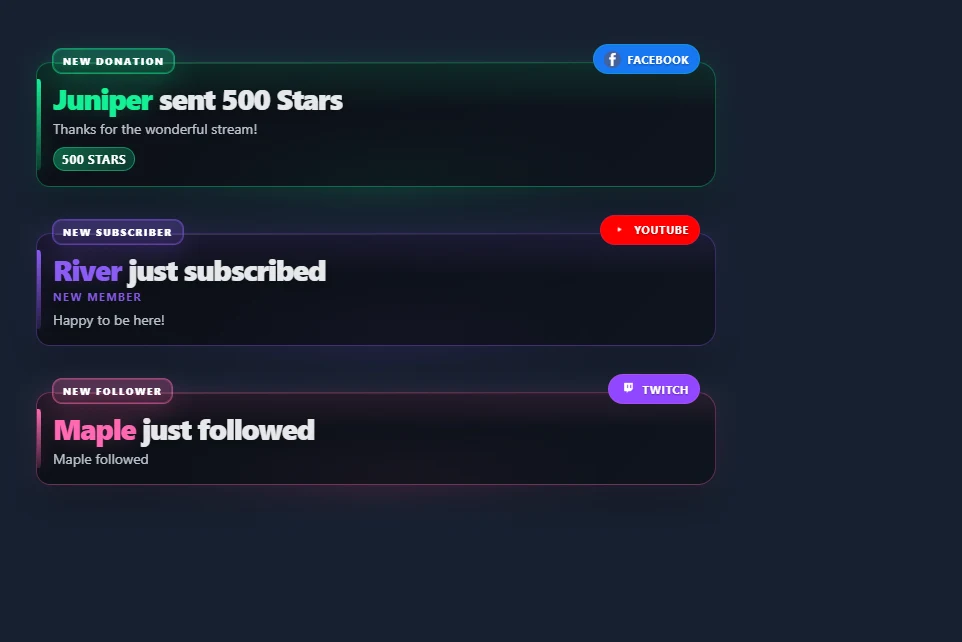
关闭 保持警报直至更换 让每张卡在配置的显示持续时间后过期。堆叠立即显示符合条件的到达者;当堆栈关闭时,应用单一警报队列。新警报时会播放声音。持久视频播放一次,媒体区域在显示持续时间后隐藏,而文本保持可见。
使用紧凑的受众事件列表
打开 动态 / 事件 并选择 最近三条 — 透明。受众预设隐藏标题、时间戳、元数据、点击功能、计数、广告通知和休闲活动。它保留关注、订阅、付费支持和其他选定的事件类别。如果您想单独自定义其隐藏项目,请关闭预设。
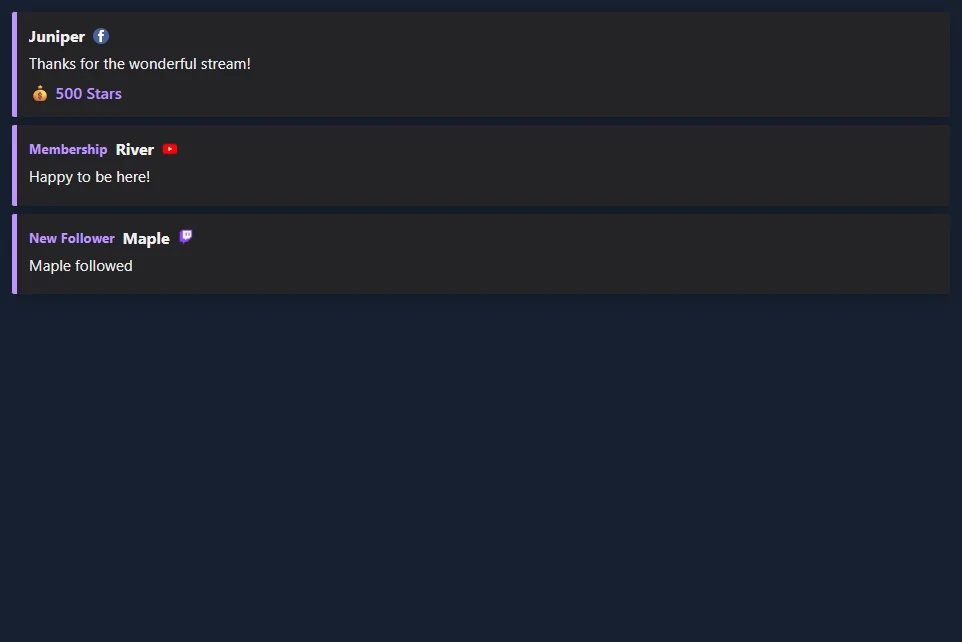
使用 选择出现哪些事件 过滤类别,以及 要监控的来源 来过滤平台。套装 删除之后的事件 为零或留空以保留行直到被替换。 预览受众群体列表.
选择样式和布局
浏览所有事件列表样式。每张图库卡都有一个屏幕截图和一个使用您的会话的链接。多重警报支持其现有的艺术作品和堆栈警报主题,以及广播、轮廓、圆形药丸和霓虹灯治疗。
| 布局 | 可用于 |
|---|---|
| 列表 | 最近发生的一些事件,最新的位于顶部或底部。 |
| 横卡 | 场景中的一行。设置行宽以适合可用空间。 |
| 轮播事件 | 一次一个可见事件,循环显示保留的事件。 |
| 最新分类 | 每个类别中的最新活动。增加可见限制以包含更多类别。 |
| 滚动条 | 一段移动的保留事件。滚动周期控制其速度。 |
调整文本对齐、换行、行宽、间距、背景不透明度和强调色。背景不透明度用纯色半透明背景替换卡片的渐变。进入动画可以使用默认样式、幻灯片、淡入淡出或无。退出动画可以淡出或滑动离开的卡片。减少运动偏好会禁用运动。
Build a classic stream bar
Three overlays combine into a familiar stream layout: a fundraising bar along the top, recent events in a corner and running totals along the bottom. Each one is its own Browser Source, so you can use any of them alone.
| Piece | Where to turn it on | What it shows |
|---|---|---|
| Fundraiser Banner | 打赏罐和目标进度条: set Display Style to Fundraiser Banner. | A flat bar with the goal title, amount raised and goal on one line. Size the source to about 900 × 40. 预览 |
| Spotlight event list | 动态 / 事件: set Feed style to Spotlight. | One-line rows that hug the right edge, with the newest event highlighted. It needs no other settings and shows the last three events. 预览 |
| Stream stats strip | 元数据栏: open Stream stats,选择 Stats to show, then set Style preset to Strip. | The biggest donation, subs today, bits and the time, with an optional latest chat line. Size the source to your canvas width and about 42 tall. 预览 |
The strip counts donations, subs, bits and follows from the events it receives while it is running, so it does not include anything from before it was added to your scene. Stats, counters and the subathon use the dock feed. To count subscription and follow events, leave 从扩展坞中排除警报事件 off. Totals are saved in the browser showing it and survive a refresh. They clear at midnight, or set Reset totals 为 Only with the reset button and use Reset stream stats in the popup. A gifted sub counts once for each sub in the gift, and resubs count as subs. Biggest donation compares USD values and shows the amount as the viewer sent it, so large Bits cheers can take the top spot. Test events you send count too, so reset before going live.
Rename a stat from the popup, for example biggestlabel=Biggest D。使用 stats=biggest,donations,subs,bits,follows,lastchat,clock in any order to choose what appears. In Spotlight, textalign=left moves the rows to the left, cardbg 和 accent set the highlight colors, and textcolor sets the older rows. On the banner, fillstart, trackcolor, bartextcolor, barheight 和 bartextsize change its look.
Show the latest and top supporters
The Meta Data Bar's Stats to show also has presets for the labels you see on many channels: the latest follower, sub, tip and Bits, the top gifter and top Bits of the day, and your total subs and followers. Each one fills in from events as they arrive. Before the first event, a label shows a dash.
To choose your own set, edit stats= in the link: latestfollow, latestsub, latesttip, latestbits, latestraid, topgifter, topbits, totalsubs 和 totalfollows work alongside the keys above, and latestfollowlabel=Newest renames one. Latest values and totals carry over midnight; the top lists start again each day. Total subs and followers need a source that reports them, such as Twitch EventSub. 预览
Count deaths, wins or anything else
In the Meta Data Bar, list each counter as Name|!command, separated by commas, for example Deaths|!death,Wins|!win. Moderators, the host and admins change them from chat. On YouTube, your own channel is not marked as a moderator, so add your name under "Identify the hosts' name" in SSN. Anyone else's message is ignored unless you turn on Allow viewer adds. That lets each viewer add 1 every five seconds; only moderators can set or reset a count.
| Type this | 会发生什么 |
|---|---|
!death | Adds one. |
!death +3 或 !death -1 | Adds or removes that many. |
!death =10 | Sets the count. |
!death reset | Back to zero. |
Add rules to let support raise a counter on its own. Owed Pushups|!pushup|sub:15|gift:15 adds 15 for each sub and each gifted sub. You can also use bits (per 100 Bits), tip (per $1) and follow. Counters are saved in the browser showing them and only reset when you ask, and Reset stream stats leaves them alone. 预览
Stack several goals in one source
添加 goal: to a counter and it shows progress such as 3/25 with a bar. List a few and set Layout to Column to get a goal panel: Sub Goal|!subgoal|sub:1|goal:25,Bits Goal|!bitsgoal|bits:100|goal:20000,Follower Goal|!followgoal|follow:1|goal:150,New Mic|!mic|tip:1|goal:200。添加 daily:1 for a daily goal that starts over at midnight. A goal with only a tip rule shows dollars. Mods can correct one in chat, such as !subgoal =12. For a single large goal with animated styles, use 打赏罐和目标进度条 作为替代。 预览
Run a subathon timer
In the Meta Data Bar, set a Starting time such as 6h, then the minutes each sub, 100 Bits, $1, follow and raid adds. For tiers, list three values: 6,15,40。开启 Show rules to display them, and set a longest time to limit what support can add. Moderators can still go past it. Time for follows can be farmed by unfollowing and refollowing, so leave that at 0 unless you trust your chat. The Cards style gives a large clock.
The clock waits for you. Press Start in the popup, or have a moderator type !subathon start. Moderators can also use pause, add 30m, remove 10m, set 6h 和 reset. On YouTube, your own channel is not marked as a moderator, so use the popup buttons or add your name under "Identify the hosts' name" in SSN. It keeps running through a refresh, and Reset stream stats does not touch it. Once it reaches zero, new support no longer extends it, but a moderator can use add to bring it back. Support only adds time while the overlay is open, so keep the source active during the event. 预览
历史和控制
启用 刷新后记住可见事件 当其浏览器源重新加载时保持面板填充。历史记录是该浏览器、会话和板名称的本地记录; OBS和你的普通浏览器有单独的存储。保留设置范围为 1 至 168 小时。恢复的行使用当前过滤器,不会重播声音或触发自动化。在多重警报中,此选项需要堆叠。
赋予不同的场景不同的 董事会名称。弹出命令针对相应的板名称和表面。发送到断开连接的覆盖层的命令不是保存的状态更改。暂停将新到达的事件保存在最多 500 个事件的堆栈和提要缓冲区中;简历显示它们。如果该缓冲区已满,则其最早的等待事件将被替换。单一警报模式使用其配置的队列限制。
销 切换最新卡的密码;固定的卡片占据可见的插槽。如果每个插槽都已固定,请取消固定卡以接纳新事件。 移除 删除最新的卡。 清除 删除可见事件、等待事件和该板的已保存历史记录。多重警报还提供跳过、静音、取消静音和重播功能。重播是显示操作,而不是新的捐赠或事件流触发器。
对于私人事件仪表板,启用 显示操作员按钮 固定或删除单独的行。在受众浏览器源中关闭此选项。
连接您想要显示的事件
两个叠加层都使用您的 SSN 源提供的事件。覆盖样式不会添加平台权限或新的事件订阅。
| 来源 | 设置和事件报道 |
|---|---|
| Twitch | 使用 Twitch EventSub 对于您的帐户有权访问的关注、订阅、礼物、欢呼和突袭。仅聊天捕获不会取代 EventSub。 |
| 标准 Facebook 捕获可以将可见的星星捐款转化为付费支持行。 Facebook API 聊天捕获不提供星星数量。对于关注者和支持者订阅,请使用将这些通知发送至 SSN 的事件提供商; Facebook 聊天捕获本身并不能提供这些功能。 | |
| YouTube | 会员资格、礼物、Super Chats、Super Stickers 和珠宝取决于所选的捕获模式。公共订阅者通知需要其 API 路径。参见 事件兼容性. |
| Kick 和 TikTok | 使用可用的支持活动的来源进行关注、订阅或赠送礼物。选择您要显示的事件类别;喜欢和加入可以隐藏。 |
| Streamlabs 和 StreamElements | SSN 可以捕获现有的提供商事件源。连接 SSN 中的提供程序并保持其源处于活动状态。可用事件取决于提供商连接和源模式。您可以使用SSN的显示器,同时保留事件或提示的提供者。 |
| 其他 SSN 来源 | 捐赠金额和认可的关注、会员资格、礼物和袭击事件可以使用相同的显示。参见 事件参考 对于特定于源的字段和支持的操作。 |
如果缺少真实事件,请首先检查它是否出现在 SSN 的活动源中。检查源连接和事件权限(如果不存在);检查覆盖过滤器和最小数量(如果存在)。
来自 Streamlabs 或 StreamElements
对于 Streamlabs 事件列表的始终可见行为,请使用 显示多个警报 + 保持警报直至更换 在多重警报中,或在事件中预设的受众。 可见警报/最大事件 设置计数。历史记录选项可在同一浏览器中恢复最近可见的卡片。使用类别过滤器和最小值控件来选择显示的支持。
您可以将 SSN 的链接直接添加为 OBS 或 Streamlabs Desktop 中的浏览器源。它不需要 SSN 操作员底座。使用图库中的 SSN 样式,然后调整颜色和间距以适合您的场景。