
Donation mode or Hype scoring?
| Mode | What it counts | Best for |
|---|---|---|
| Normal Tip Jar | Super Chats, Cheers/Bits, tips, and other payloads with a donation amount | Money or native-unit goals |
| Donation count | Each qualifying paid event as one, regardless of its value | Goals such as 7 / 20 Super Chats |
| Hype Cup Scoring | Donations, memberships/subscriptions, renewals, and gifted memberships/subscriptions | One combined supporter-points goal |
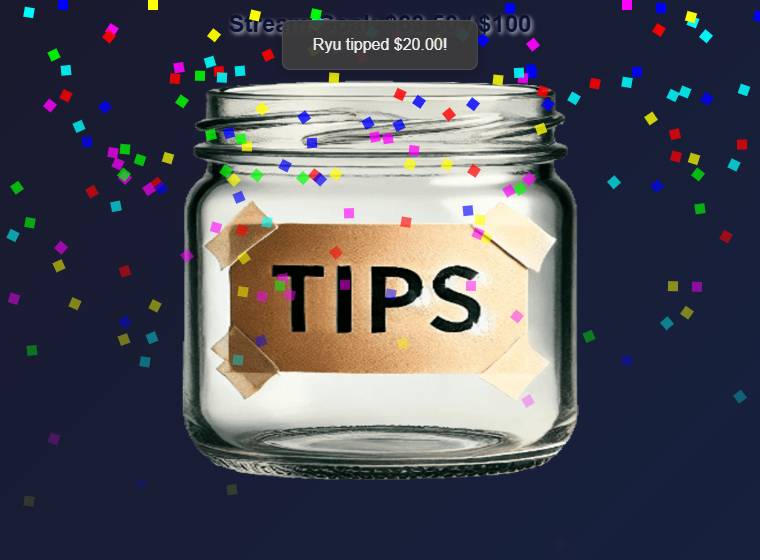
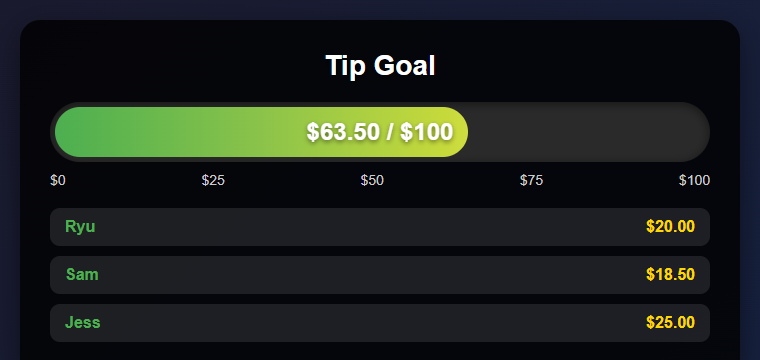
style=meter): the same goal shown as a progress bar with recent supporters.Choose a style
Open the safe style preview gallery to compare sample layouts on light or dark backgrounds. Previews do not connect to live overlays or read or save donation totals. Paste your existing tip jar link in the gallery to copy a styled link while keeping its session, goal, and filter settings.
Existing styles keep their original appearance by default. Enable Refreshed appearance (&refresh) only if you want the updated spacing, colors, and typography. The new styles below are separately selectable.
All styles use the same donation totals, filters, count goals, Hype scoring, and recurring goals. Choose one under Style, Goal, and Filters → Display Style.
Enable Hide dollar signs in the same section (or add &hidecurrency to the overlay URL) to display 0.00 / 500 instead of $0.00 / $500. This is off by default and only changes the goal display; donation values, conversion, and Bits or other unit labels stay the same.
- Jar: the classic cup with falling items.
- Goal Meter: a progress bar with recent supporters in a dark panel.
- Fluid Goal Bar: a wide animated bar for a prominent goal.
- Compact Bar: a small bar suited to a corner; Vertical Bar: a thermometer for a side column.
- Minimal: large totals and percentage; Text Only: a simple text readout.
- Goal Card (
style=card): a compact panel with a large total and slim progress bar. - Progress Ring (
style=ring): a circular percentage display above the goal total. - Lower Third (
style=lowerthird): a wide, low panel with the title beside the total. - Segmented Bar (
style=segmented): a goal panel with twenty progress segments.
The new panels support Default, Neon, and Gold themes. Existing fill-color settings also work on them; the ring uses a solid stroke that changes with progress. Backgrounds outside the overlay remain transparent for OBS.
For the four new panels, optional controls include panelopacity=0.5 (0–1), accent=%2366d9b2 (six-digit hex color), amountsize=32 (12–96 pixels), and hidepercent. Explicit fill start/end colors take precedence over the accent for the progress fill. Leave values blank to use each style's defaults. Bar text size and “bar only” apply to Fluid Goal Bar; a custom jar image applies only to Jar.
Set it up
- Activate the YouTube, Twitch, or other source in Social Stream Ninja.
- Open Tip Jar and Goal Meter, then open its options.
- Leave Hype Cup Scoring off for a donation-only goal. Enable it for a mixed supporter goal.
- Choose whether the goal measures donation value or the number of qualifying donations.
- Choose the display style, goal, title, source/event filters, and persistence behavior.
- Copy the updated Tip Jar link and add it to OBS as a Browser Source.
Count YouTube Super Chats instead of money
- Leave Hype Cup Scoring off.
- Set Goal measures to Number of qualifying donations.
- Set Source filter to YouTube.
- Set Paid event filter to Super Chats only.
- Set the goal target, such as
20. The overlay displays progress such as7 / 20 Super Chats.
Super Chat value does not affect a count goal: a $1 Super Chat and a $100 Super Chat each add one. Memberships, gifted memberships, Super Stickers, and YouTube Gifts do not move a Super Chat-only goal.
How Hype values work
- Sub/member points: fixed points for each new membership/subscription or renewal.
- Gifted sub/member points: fixed points for each gift. A bundle of 5 contributes
5 × giftpoints. - Donation points per USD: multiplier applied after supported cash donations are converted to USD.
- Point unit label: changes the displayed label. Using
$does not make membership points an exact cash value.
YouTube gifts are not all the same
| YouTube event | Meaning | How it counts |
|---|---|---|
| Super Chat / Super Sticker | A paid message with a currency amount | Normal or Hype mode |
| Gifted memberships | Someone bought memberships for other viewers | Hype mode uses gift count × configured gift points |
| Gift recipient | One viewer received a membership from the bundle | Ignored for points by default to prevent double counting |
| Jewels / virtual gifts | A separate virtual-gift event with a native-unit amount | Use the matching native-unit filter |
Gifted-membership events provide the number of memberships and membership level, but not the purchase price or creator's net revenue. Their exact cash value cannot be calculated from the event.
Goal completion and saved totals
- Normal donation goals retain their total unless a reset is requested.
- Hype goals reset after completion by default; the completion delay controls how long the completed value stays visible.
- Carry extra points preserves points beyond the completed goal.
- Keep total and advance target creates a cumulative rolling goal.
- Recurring goal increment creates repeating levels.
- Keep amount between sessions stores the amount and history in that browser or OBS profile.
Troubleshooting
| Symptom | What to check |
|---|---|
| Nothing updates | Source is active, overlay is open, session IDs match, and filters match the event. |
| Super Chats count but memberships do not | Enable Hype Cup Scoring and leave donation type on All donations. |
| Gifted memberships add less than expected | They use fixed gift points, not an unavailable purchase price. |
| Total drops after reaching the goal | Hype resets by default; use a rolling goal for a cumulative total. |
| An old amount returns | Persistence is enabled in the same browser or OBS profile. |
| Gift memberships appear twice | Disable individual gift-recipient counting. |
| Super Chat count includes Super Stickers | Set Paid event filter to Super Chats only. |
| Gifted memberships move a Hype goal | Enable Exclude YouTube gifted memberships, or exclude all gifts from Hype scoring. |
The popup's test buttons currently test donation rows. For membership or gift issues, use the Dock or Events Dashboard with the same session to confirm the event arrives before troubleshooting the goal.